CRM Tips
Back
Most popular
What is a LinkedIn CRM? Complete Guide 2026
Capture conversations and managing deals from LinkedIn

A LinkedIn CRM is a customer relationship management system built with native LinkedIn as a core channel, not a traditional CRM with a LinkedIn plugin bolted on.
The difference matters.
A true LinkedIn CRM:
Captures LinkedIn conversations directly into the platform without manual copy-paste or API delays
Ties each message to a deal and contact automatically, with full conversation history visible in the CRM
Allows you to send LinkedIn outreach (connection requests, messages, voice notes) directly from the CRM interface
Unifies pipeline and LinkedIn activity — your deal stage and your LinkedIn engagement are in the same record
A traditional CRM with LinkedIn integration, by contrast, requires you to manually record LinkedIn interactions or relies on fragile API connections that break frequently.
Why LinkedIn-native sales management
The problem without it: the copy-paste trap
Without a LinkedIn CRM, here's what actually happens:
A prospect replies to a message on LinkedIn with interest. Your sales rep:
Reads the message on LinkedIn.com
Manually creates a contact record in Salesforce or HubSpot
Copies relevant details from the LinkedIn message into the deal notes
Switches back to LinkedIn to send a follow-up message
Later, reviews the message on LinkedIn again, but the CRM deal doesn't show it because the CRM can't see incoming LinkedIn messages
Weeks later, realizes the prospect sent a reply on LinkedIn — but the rep never saw it because they were checking the CRM, not LinkedIn
By then, the deal is cold. Context is lost. Nobody has the full thread.
The cost of lost context
A LinkedIn CRM eliminates this by keeping all conversations in one place:
Every LinkedIn message appears in the CRM the moment it arrives
Your deal pipeline and your LinkedIn inbox are the same system
Automation fills in contact details automatically
The next rep on the team can see the entire conversation history without wondering if something important was missed on LinkedIn
For teams where LinkedIn is the primary sales channel (B2B SaaS, recruiting, executive coaching, consulting), this isn't a nice-to-have, it's a necessity.
Key features to look for in a LinkedIn CRM
Not all LinkedIn CRMs are created equal. Here are the features that separate capable tools from mediocre ones:
1. True native linkedIn integration (not an API wrapper)
The real thing: Native integration means the platform has its own direct connection to LinkedIn's infrastructure. Messages appear instantly. Sending a connection request happens at LinkedIn's native speed (not queued through a bot).
The fake thing: An "API-based integration" sounds technical but often means messages appear with 30-60 minute delays, and automation runs slower than LinkedIn allows.
Ask vendors: "Do messages appear instantly or on a delay?" If they hesitate, move on.
2. Unified Inbox with multi-channel context
A true LinkedIn CRM can show you:
Messages from LinkedIn
Messages from email (if the prospect emailed you)
Messages from WhatsApp (if they switched channels)
All in one feed tied to the deal
This matters because prospects don't stay on one channel. They'll message you on LinkedIn, then email you, then ask for a call on WhatsApp. A LinkedIn CRM worth its salt remembers all of it.
3. Conversation-aware deal tracking
The best LinkedIn CRMs can:
Automatically detect when a prospect is interested (e.g., "Let's set up a call")
Suggest the next deal stage based on conversation content
Alert you if a prospect has gone silent for X days (automatic dead deal warning)
Show sentiment—is this prospect enthusiastic, neutral, or pulling away?
Without this, you're still manually updating deal stages. That defeats the purpose.
4. Automated LinkedIn sequences
A LinkedIn CRM should let you:
Create multi-step connection request + message sequences
Personalize each message with company name, role, or custom fields
Set conditions ("If they accept, send message A; if they don't respond in 3 days, send message B")
Schedule sequences for natural send times
Pause sequences if they reply
This automates the "first touch" without feeling robotic.
5. Customizable pipeline & deal fields
Sales processes differ. Some teams have 3 stages; others have 10. A good LinkedIn CRM should let you:
Create custom deal fields (not just "company" and "deal size")
Build multiple pipelines for different sale types
Define custom entities (e.g., "Decision Committee" as a separate entity type)
Link contacts to multiple deals and accounts
This prevents the "our process doesn't fit your tool" problem.
6. AI context (not just automation)
The newest LinkedIn CRMs add AI that reads conversations and suggests actions:
"Based on this conversation, this prospect is interested in pricing. Suggest a demo call."
"This deal is stalled. Last message was 14 days ago. Suggest a check-in message."
"This prospect mentioned three pain points. Here's how your product addresses each."
This isn't required but increasingly table stakes.
Best LinkedIn CRM tools compared 2026
Dalil AI — The full AI Sales OS (not just a LinkedIn CRM)
Best for: Teams selling via LinkedIn + WhatsApp + email who want one platform instead of a LinkedIn CRM + outreach tool + automation.
LinkedIn features:
Native LinkedIn messaging (instant delivery)
LinkedIn connection request + DM sequences with personalization
LinkedIn activity tied to deals with full conversation history
Plus: The same for WhatsApp + Email
Plus: AI deal intelligence reading LinkedIn conversations
Plus: Workflow automation connecting all channels
Plus: Flexible CRM with custom entities and relationships
Channels: LinkedIn, WhatsApp, Email (all native, equal depth)
Pricing: www.usedalil.ai →
Strengths: Single platform covering everything; AI understands conversations; native multi-channel (not LinkedIn-first); zero context lost between channels
Why it's different: A LinkedIn CRM handles LinkedIn. Dalil AI is an AI Sales OS that includes LinkedIn as one native channel among many. You don't need Breakcold + Lemlist + Zapier when Dalil AI is all three in one.
Breakcold — The LinkedIn CRM leader
Best for: Teams selling primarily via LinkedIn; companies wanting a lightweight CRM designed around social selling.
LinkedIn features:
Native LinkedIn messaging with instant delivery
LinkedIn connection request sequences with personalization
Multi-step sequences (request → message → voice note)
Social selling feed showing prospect activity
Deal tracking tied to LinkedIn interactions
Channels: LinkedIn, WhatsApp, Email, Telegram
Pricing: Pro plan at $59–80/user/month (note: the lower-tier plan doesn't include multi-channel)
Strengths: Best-in-class LinkedIn integration; lightweight and fast; excellent UI; strong automation
Limitations: Email and WhatsApp not as deeply integrated as LinkedIn; limited custom fields compared to enterprise CRMs; smaller ecosystem of integrations
Honest take: If your team lives on LinkedIn and wants a purpose-built tool for that, Breakcold is one of the best available. It's simpler than HubSpot and cheaper.
HubSpot — The established CRM with linkedIn add-ons
Best for: Teams needing a mature CRM ecosystem and willing to buy LinkedIn integration separately.
LinkedIn features:
LinkedIn integration via third-party connectors (not native)
Requires LinkedIn Sales Navigator ($80/mo extra)
Requires Surfe or similar ($29/mo) for seamless synchronization
Deal tracking in HubSpot but LinkedIn activity on LinkedIn.com
Channels: Email (native), LinkedIn (via add-ons), WhatsApp (requires separate tool)
Pricing: $45–1,170+/user/mo for CRM; add another $80–100 for LinkedIn capability
Strengths: Massive ecosystem; powerful reporting; best for large teams
Limitations: LinkedIn experience is pieced together; expensive for what LinkedIn sellers need; feels built for email first, LinkedIn second; requires multiple tools to match what a native LinkedIn CRM does
Honest take: HubSpot is trusted and mature. But if LinkedIn is your primary channel, you'll spend more money for a worse LinkedIn experience than Breakcold provides.
Stack cost: HubSpot Pro + LinkedIn SN + Surfe + Lemlist sequences = $250+/user/mo just to approximate a dedicated LinkedIn CRM.
Attio — The modern CRM with strong workflows
Best for: Teams wanting a beautifully designed CRM with flexible data models but willing to manage LinkedIn separately.
LinkedIn features:
Beautiful contact and deal interface
Email-first integration (LinkedIn is secondary)
Can create custom workflows but sequences are email-only
Limited native LinkedIn messaging
Channels: Email (strong), LinkedIn (basic), WhatsApp (no)
Pricing: $79–149/user/mo
Strengths: Modern design; flexible data model; strong workflow automation
Limitations: LinkedIn experience is limited; no native LinkedIn sequences; lacks AI deal intelligence
Honest take: Attio is beautiful and thoughtfully designed. But it's not a LinkedIn CRM—it's a modern CRM that happens to have LinkedIn contact sync. For LinkedIn-primary teams, you'd still need Lemlist or similar for outreach.
Pipedrive — The pipeline-first CRM
Best for: Sales teams focused on pipeline visibility; lightweight alternative to HubSpot.
LinkedIn features:
Basic LinkedIn profile sync
Previously had WhatsApp integration (removed in 2025)
Requires separate tools for LinkedIn outreach
Channels: Email (basic), LinkedIn (data-only, not messaging)
Pricing: $39–169/user/mo
Strengths: Visual pipeline; simple interface; affordable
Limitations: LinkedIn is data-only (no messaging); no native sequences; feels legacy
Honest take: Pipedrive is solid for traditional sales. But for LinkedIn selling, you're still stacking tools.
Stack cost: Pipedrive + Dripify + Lemlist = $130+/user/mo just for basic LinkedIn sales capability.
Comparison table: LinkedIn CRM tools vs Dalil AI
Feature | Breakcold | HubSpot + LinkedIn SN | Attio | Pipedrive | Dalil AI |
|---|---|---|---|---|---|
Native LinkedIn messaging | ✅ Best-in-class | ⚠️ Requires add-ons | ⚠️ Limited | ❌ Data-only | ✅ Native |
LinkedIn sequences | ✅ Strong | ⚠️ Limited | ❌ Email only | ❌ Needs separate tool | ✅ Native |
Native WhatsApp | ✅ Yes | ❌ Needs separate tool | ❌ No | ❌ Removed | ✅ Native |
Native email | ✅ Yes | ✅ Strong | ✅ Yes | ✅ Basic | ✅ Strong |
Workflow automation | ⚠️ Basic | ✅ Strong | ✅ Very strong | ⚠️ Basic | ✅ Strong |
AI deal intelligence | ❌ Limited | ⚠️ Basic | ⚠️ Ask Attio | ❌ No | ✅ Reads all conversations |
Custom CRM entities | ⚠️ Limited | ✅ Good | ✅ Excellent | ⚠️ Limited | ✅ Excellent |
Cost (all-in) | $59–80 | $170+ | $79–149 | $39–169 | |
Single login required | ✅ Yes | ❌ 3+ logins | ✅ Yes | ✅ Yes (if LinkedIn separate) | ✅ Yes |
Unified context across channels | ⚠️ LinkedIn strong, others weaker | ❌ Breaks between tools | ⚠️ Email strong | ❌ Limited | ✅ Full |
How to choose the right LinkedIn CRM
Ask yourself these questions:
Question 1: Is LinkedIn your primary sales channel?
Yes → Breakcold or Dalil AI (Breakcold if you want a focused tool; Dalil AI if you also sell via WhatsApp or email)
No → Any CRM with decent LinkedIn support (HubSpot, Attio, Pipedrive) — but you'll need a separate outreach tool
Question 2: Do your prospects also message you via WhatsApp or email?
Yes → Dalil AI (keeps all channels in one system with shared context)
No → Breakcold is sufficient if LinkedIn is enough
Question 3: How complex is your sales process?
Simple (1–3 deal stages) → Breakcold is fast and lightweight
Complex (custom entities, multi-pipeline) → Dalil AI or Attio for flexibility; Breakcold will feel limiting
Question 4: Do you need workflow automation beyond "move deal to next stage"?
Yes → Dalil AI (native automation) or Attio (strong but email-focused)
No → Breakcold is fine
Question 5: Do you want AI that understands your deals?
Yes → Dalil AI (AI reads LinkedIn/WhatsApp/email conversations and coaches next steps)
No → Breakcold, HubSpot, or Attio
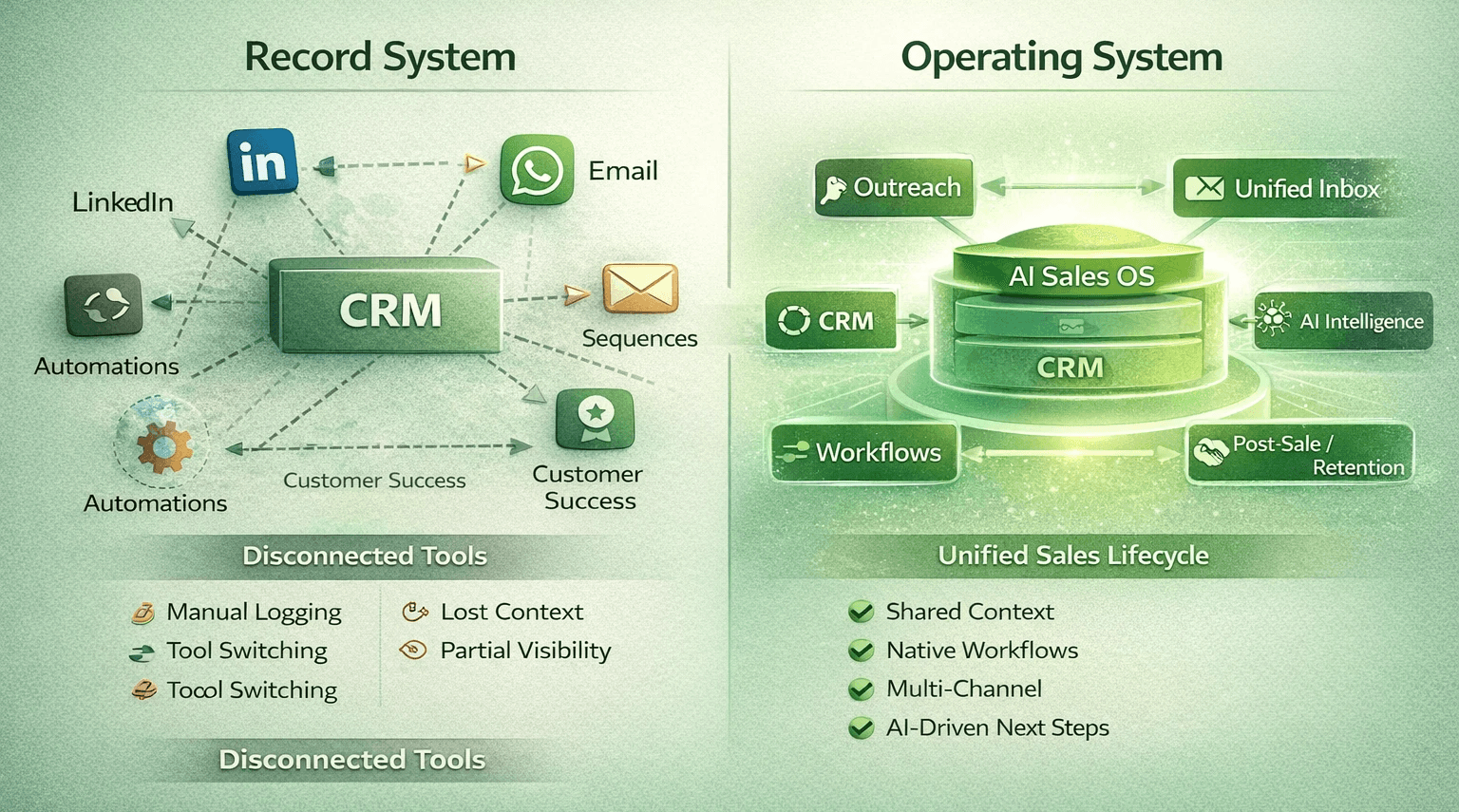
Beyond LinkedIn CRM: The AI Sales OS
Here's what most LinkedIn CRM articles won't tell you: a LinkedIn CRM is one piece of a bigger puzzle.
A prospect messages you on LinkedIn → that's great (ENGAGE stage). But where did they come from? Did your team send them a LinkedIn connection request sequence? Did they reply to an email? Are they also considering your competitor?
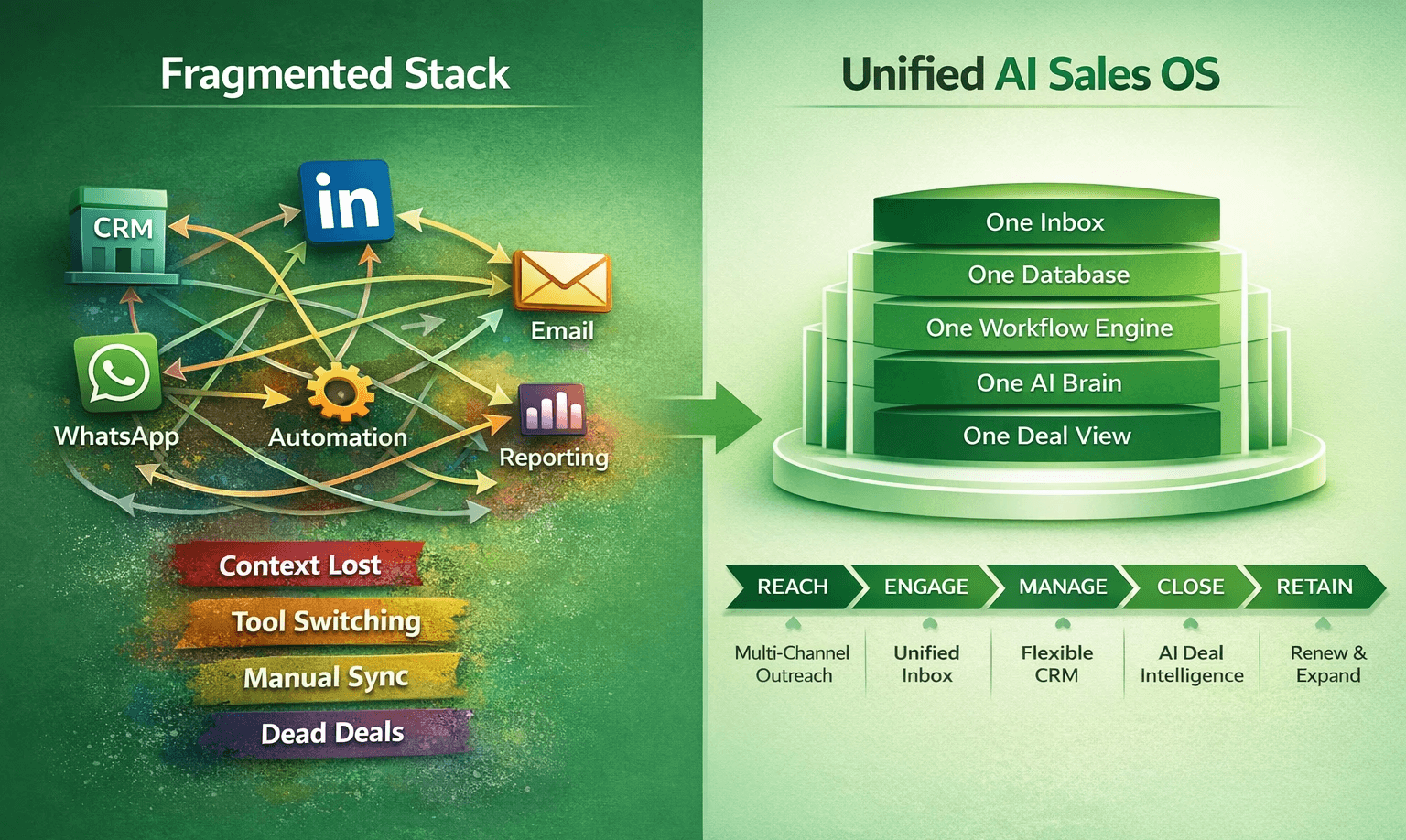
A standalone LinkedIn CRM answers the first question (engagement) but not the others. That's why the most forward-thinking sales teams are moving beyond channel-specific CRMs to an AI Sales OS — one platform covering the full sales lifecycle.
The full sales lifecycle
REACH → ENGAGE → MANAGE → CLOSE → RETAIN
REACH: Multi-channel sequences (LinkedIn, WhatsApp, email) bringing prospects in
ENGAGE: Unified inbox capturing all conversations across all channels
MANAGE: CRM tracking deals with custom fields and relationships
CLOSE: AI deal intelligence predicting close probability and suggesting next steps
RETAIN: Same platform for post-sale customer management
A LinkedIn CRM handles ENGAGE (and maybe partial REACH if it has sequences). An AI Sales OS handles all five.
Instead of:
Breakcold for LinkedIn + Lemlist for email sequences + Zapier for automation = 3 tools, 3 logins, context lost between channels
An AI Sales OS like Dalil AI does all of it in one platform, with full context shared across every interaction. A prospect's LinkedIn message, their email reply, and their WhatsApp voice note all live in the same deal record with AI analyzing them together.
Learn more: Explore the AI Sales OS →
Start your 14-day free trial →
Frequently Asked Questions
What's the difference between a LinkedIn CRM and a regular CRM? A LinkedIn CRM has native, instant integration with LinkedIn — messages appear automatically, you can send connection requests and DMs from the CRM, and LinkedIn activity is tied directly to deals. A regular CRM requires manual syncing or slow API connections, treating LinkedIn as a secondary data source. For teams selling via LinkedIn, the difference is huge.
Is Breakcold a LinkedIn CRM? Yes. Breakcold is the most widely used standalone LinkedIn CRM. It's purpose-built for social selling with native LinkedIn, WhatsApp, email, and Telegram support. However, it's a LinkedIn-focused CRM, not a full sales operating system — it doesn't include integrated outreach automation (you'd add Lemlist for that) or advanced workflow automation (you'd add Zapier for that).
Can I use HubSpot as a LinkedIn CRM? Technically yes, but not effectively. HubSpot is a general CRM with LinkedIn integrations. To get a proper LinkedIn CRM experience with HubSpot, you need to add LinkedIn Sales Navigator ($80+/mo), Surfe ($29+/mo), and Lemlist ($59+/mo) — costing $250+/user/mo total. For that price, you could use Dalil AI (an AI Sales OS that covers all channels) or Breakcold (a dedicated LinkedIn CRM at 1/4 the cost).
What does "native LinkedIn integration" actually mean? Native means the platform has its own direct API connection to LinkedIn. Messages appear instantly (not queued or delayed). Sending a connection request happens at LinkedIn's native speed. The platform can read LinkedIn's latest features without waiting for third-party developers. If a tool relies on Zapier or a third-party connector, it's not native.
How much does a LinkedIn CRM cost? Breakcold (the leader) starts at $29/mo but the meaningful plan is $59–80/mo. HubSpot + LinkedIn integrations run $170+/mo all-in. Attio is $79–149/mo but requires a separate LinkedIn CRM for the same feature depth. Dalil AI is www.usedalil.ai →.
Should I use a LinkedIn CRM or an AI Sales OS? Use a LinkedIn CRM if you only sell via LinkedIn and don't want to manage multiple tools. Use an AI Sales OS if you sell via multiple channels (LinkedIn + WhatsApp + email) — one platform with unified context is cheaper and faster than managing a LinkedIn CRM + outreach tool + automation.
Can a LinkedIn CRM replace my entire sales stack? No — a LinkedIn CRM handles customer relationship management on LinkedIn. It doesn't replace an email outreach tool (unless it includes email sequences), workflow automation (unless it includes no-code automations), or AI coaching (unless it includes deal intelligence). That's why an AI Sales OS exists — to replace the entire stack with one platform.
What's the best LinkedIn CRM for small teams? Breakcold for pure LinkedIn selling; Dalil AI if you also use WhatsApp or email. Both are lightweight, fast, and priced for small teams.
A LinkedIn CRM is a customer relationship management system built with native LinkedIn as a core channel, not a traditional CRM with a LinkedIn plugin bolted on.
The difference matters.
A true LinkedIn CRM:
Captures LinkedIn conversations directly into the platform without manual copy-paste or API delays
Ties each message to a deal and contact automatically, with full conversation history visible in the CRM
Allows you to send LinkedIn outreach (connection requests, messages, voice notes) directly from the CRM interface
Unifies pipeline and LinkedIn activity — your deal stage and your LinkedIn engagement are in the same record
A traditional CRM with LinkedIn integration, by contrast, requires you to manually record LinkedIn interactions or relies on fragile API connections that break frequently.
Why LinkedIn-native sales management
The problem without it: the copy-paste trap
Without a LinkedIn CRM, here's what actually happens:
A prospect replies to a message on LinkedIn with interest. Your sales rep:
Reads the message on LinkedIn.com
Manually creates a contact record in Salesforce or HubSpot
Copies relevant details from the LinkedIn message into the deal notes
Switches back to LinkedIn to send a follow-up message
Later, reviews the message on LinkedIn again, but the CRM deal doesn't show it because the CRM can't see incoming LinkedIn messages
Weeks later, realizes the prospect sent a reply on LinkedIn — but the rep never saw it because they were checking the CRM, not LinkedIn
By then, the deal is cold. Context is lost. Nobody has the full thread.
The cost of lost context
A LinkedIn CRM eliminates this by keeping all conversations in one place:
Every LinkedIn message appears in the CRM the moment it arrives
Your deal pipeline and your LinkedIn inbox are the same system
Automation fills in contact details automatically
The next rep on the team can see the entire conversation history without wondering if something important was missed on LinkedIn
For teams where LinkedIn is the primary sales channel (B2B SaaS, recruiting, executive coaching, consulting), this isn't a nice-to-have, it's a necessity.
Key features to look for in a LinkedIn CRM
Not all LinkedIn CRMs are created equal. Here are the features that separate capable tools from mediocre ones:
1. True native linkedIn integration (not an API wrapper)
The real thing: Native integration means the platform has its own direct connection to LinkedIn's infrastructure. Messages appear instantly. Sending a connection request happens at LinkedIn's native speed (not queued through a bot).
The fake thing: An "API-based integration" sounds technical but often means messages appear with 30-60 minute delays, and automation runs slower than LinkedIn allows.
Ask vendors: "Do messages appear instantly or on a delay?" If they hesitate, move on.
2. Unified Inbox with multi-channel context
A true LinkedIn CRM can show you:
Messages from LinkedIn
Messages from email (if the prospect emailed you)
Messages from WhatsApp (if they switched channels)
All in one feed tied to the deal
This matters because prospects don't stay on one channel. They'll message you on LinkedIn, then email you, then ask for a call on WhatsApp. A LinkedIn CRM worth its salt remembers all of it.
3. Conversation-aware deal tracking
The best LinkedIn CRMs can:
Automatically detect when a prospect is interested (e.g., "Let's set up a call")
Suggest the next deal stage based on conversation content
Alert you if a prospect has gone silent for X days (automatic dead deal warning)
Show sentiment—is this prospect enthusiastic, neutral, or pulling away?
Without this, you're still manually updating deal stages. That defeats the purpose.
4. Automated LinkedIn sequences
A LinkedIn CRM should let you:
Create multi-step connection request + message sequences
Personalize each message with company name, role, or custom fields
Set conditions ("If they accept, send message A; if they don't respond in 3 days, send message B")
Schedule sequences for natural send times
Pause sequences if they reply
This automates the "first touch" without feeling robotic.
5. Customizable pipeline & deal fields
Sales processes differ. Some teams have 3 stages; others have 10. A good LinkedIn CRM should let you:
Create custom deal fields (not just "company" and "deal size")
Build multiple pipelines for different sale types
Define custom entities (e.g., "Decision Committee" as a separate entity type)
Link contacts to multiple deals and accounts
This prevents the "our process doesn't fit your tool" problem.
6. AI context (not just automation)
The newest LinkedIn CRMs add AI that reads conversations and suggests actions:
"Based on this conversation, this prospect is interested in pricing. Suggest a demo call."
"This deal is stalled. Last message was 14 days ago. Suggest a check-in message."
"This prospect mentioned three pain points. Here's how your product addresses each."
This isn't required but increasingly table stakes.
Best LinkedIn CRM tools compared 2026
Dalil AI — The full AI Sales OS (not just a LinkedIn CRM)
Best for: Teams selling via LinkedIn + WhatsApp + email who want one platform instead of a LinkedIn CRM + outreach tool + automation.
LinkedIn features:
Native LinkedIn messaging (instant delivery)
LinkedIn connection request + DM sequences with personalization
LinkedIn activity tied to deals with full conversation history
Plus: The same for WhatsApp + Email
Plus: AI deal intelligence reading LinkedIn conversations
Plus: Workflow automation connecting all channels
Plus: Flexible CRM with custom entities and relationships
Channels: LinkedIn, WhatsApp, Email (all native, equal depth)
Pricing: www.usedalil.ai →
Strengths: Single platform covering everything; AI understands conversations; native multi-channel (not LinkedIn-first); zero context lost between channels
Why it's different: A LinkedIn CRM handles LinkedIn. Dalil AI is an AI Sales OS that includes LinkedIn as one native channel among many. You don't need Breakcold + Lemlist + Zapier when Dalil AI is all three in one.
Breakcold — The LinkedIn CRM leader
Best for: Teams selling primarily via LinkedIn; companies wanting a lightweight CRM designed around social selling.
LinkedIn features:
Native LinkedIn messaging with instant delivery
LinkedIn connection request sequences with personalization
Multi-step sequences (request → message → voice note)
Social selling feed showing prospect activity
Deal tracking tied to LinkedIn interactions
Channels: LinkedIn, WhatsApp, Email, Telegram
Pricing: Pro plan at $59–80/user/month (note: the lower-tier plan doesn't include multi-channel)
Strengths: Best-in-class LinkedIn integration; lightweight and fast; excellent UI; strong automation
Limitations: Email and WhatsApp not as deeply integrated as LinkedIn; limited custom fields compared to enterprise CRMs; smaller ecosystem of integrations
Honest take: If your team lives on LinkedIn and wants a purpose-built tool for that, Breakcold is one of the best available. It's simpler than HubSpot and cheaper.
HubSpot — The established CRM with linkedIn add-ons
Best for: Teams needing a mature CRM ecosystem and willing to buy LinkedIn integration separately.
LinkedIn features:
LinkedIn integration via third-party connectors (not native)
Requires LinkedIn Sales Navigator ($80/mo extra)
Requires Surfe or similar ($29/mo) for seamless synchronization
Deal tracking in HubSpot but LinkedIn activity on LinkedIn.com
Channels: Email (native), LinkedIn (via add-ons), WhatsApp (requires separate tool)
Pricing: $45–1,170+/user/mo for CRM; add another $80–100 for LinkedIn capability
Strengths: Massive ecosystem; powerful reporting; best for large teams
Limitations: LinkedIn experience is pieced together; expensive for what LinkedIn sellers need; feels built for email first, LinkedIn second; requires multiple tools to match what a native LinkedIn CRM does
Honest take: HubSpot is trusted and mature. But if LinkedIn is your primary channel, you'll spend more money for a worse LinkedIn experience than Breakcold provides.
Stack cost: HubSpot Pro + LinkedIn SN + Surfe + Lemlist sequences = $250+/user/mo just to approximate a dedicated LinkedIn CRM.
Attio — The modern CRM with strong workflows
Best for: Teams wanting a beautifully designed CRM with flexible data models but willing to manage LinkedIn separately.
LinkedIn features:
Beautiful contact and deal interface
Email-first integration (LinkedIn is secondary)
Can create custom workflows but sequences are email-only
Limited native LinkedIn messaging
Channels: Email (strong), LinkedIn (basic), WhatsApp (no)
Pricing: $79–149/user/mo
Strengths: Modern design; flexible data model; strong workflow automation
Limitations: LinkedIn experience is limited; no native LinkedIn sequences; lacks AI deal intelligence
Honest take: Attio is beautiful and thoughtfully designed. But it's not a LinkedIn CRM—it's a modern CRM that happens to have LinkedIn contact sync. For LinkedIn-primary teams, you'd still need Lemlist or similar for outreach.
Pipedrive — The pipeline-first CRM
Best for: Sales teams focused on pipeline visibility; lightweight alternative to HubSpot.
LinkedIn features:
Basic LinkedIn profile sync
Previously had WhatsApp integration (removed in 2025)
Requires separate tools for LinkedIn outreach
Channels: Email (basic), LinkedIn (data-only, not messaging)
Pricing: $39–169/user/mo
Strengths: Visual pipeline; simple interface; affordable
Limitations: LinkedIn is data-only (no messaging); no native sequences; feels legacy
Honest take: Pipedrive is solid for traditional sales. But for LinkedIn selling, you're still stacking tools.
Stack cost: Pipedrive + Dripify + Lemlist = $130+/user/mo just for basic LinkedIn sales capability.
Comparison table: LinkedIn CRM tools vs Dalil AI
Feature | Breakcold | HubSpot + LinkedIn SN | Attio | Pipedrive | Dalil AI |
|---|---|---|---|---|---|
Native LinkedIn messaging | ✅ Best-in-class | ⚠️ Requires add-ons | ⚠️ Limited | ❌ Data-only | ✅ Native |
LinkedIn sequences | ✅ Strong | ⚠️ Limited | ❌ Email only | ❌ Needs separate tool | ✅ Native |
Native WhatsApp | ✅ Yes | ❌ Needs separate tool | ❌ No | ❌ Removed | ✅ Native |
Native email | ✅ Yes | ✅ Strong | ✅ Yes | ✅ Basic | ✅ Strong |
Workflow automation | ⚠️ Basic | ✅ Strong | ✅ Very strong | ⚠️ Basic | ✅ Strong |
AI deal intelligence | ❌ Limited | ⚠️ Basic | ⚠️ Ask Attio | ❌ No | ✅ Reads all conversations |
Custom CRM entities | ⚠️ Limited | ✅ Good | ✅ Excellent | ⚠️ Limited | ✅ Excellent |
Cost (all-in) | $59–80 | $170+ | $79–149 | $39–169 | |
Single login required | ✅ Yes | ❌ 3+ logins | ✅ Yes | ✅ Yes (if LinkedIn separate) | ✅ Yes |
Unified context across channels | ⚠️ LinkedIn strong, others weaker | ❌ Breaks between tools | ⚠️ Email strong | ❌ Limited | ✅ Full |
How to choose the right LinkedIn CRM
Ask yourself these questions:
Question 1: Is LinkedIn your primary sales channel?
Yes → Breakcold or Dalil AI (Breakcold if you want a focused tool; Dalil AI if you also sell via WhatsApp or email)
No → Any CRM with decent LinkedIn support (HubSpot, Attio, Pipedrive) — but you'll need a separate outreach tool
Question 2: Do your prospects also message you via WhatsApp or email?
Yes → Dalil AI (keeps all channels in one system with shared context)
No → Breakcold is sufficient if LinkedIn is enough
Question 3: How complex is your sales process?
Simple (1–3 deal stages) → Breakcold is fast and lightweight
Complex (custom entities, multi-pipeline) → Dalil AI or Attio for flexibility; Breakcold will feel limiting
Question 4: Do you need workflow automation beyond "move deal to next stage"?
Yes → Dalil AI (native automation) or Attio (strong but email-focused)
No → Breakcold is fine
Question 5: Do you want AI that understands your deals?
Yes → Dalil AI (AI reads LinkedIn/WhatsApp/email conversations and coaches next steps)
No → Breakcold, HubSpot, or Attio
Beyond LinkedIn CRM: The AI Sales OS
Here's what most LinkedIn CRM articles won't tell you: a LinkedIn CRM is one piece of a bigger puzzle.
A prospect messages you on LinkedIn → that's great (ENGAGE stage). But where did they come from? Did your team send them a LinkedIn connection request sequence? Did they reply to an email? Are they also considering your competitor?
A standalone LinkedIn CRM answers the first question (engagement) but not the others. That's why the most forward-thinking sales teams are moving beyond channel-specific CRMs to an AI Sales OS — one platform covering the full sales lifecycle.
The full sales lifecycle
REACH → ENGAGE → MANAGE → CLOSE → RETAIN
REACH: Multi-channel sequences (LinkedIn, WhatsApp, email) bringing prospects in
ENGAGE: Unified inbox capturing all conversations across all channels
MANAGE: CRM tracking deals with custom fields and relationships
CLOSE: AI deal intelligence predicting close probability and suggesting next steps
RETAIN: Same platform for post-sale customer management
A LinkedIn CRM handles ENGAGE (and maybe partial REACH if it has sequences). An AI Sales OS handles all five.
Instead of:
Breakcold for LinkedIn + Lemlist for email sequences + Zapier for automation = 3 tools, 3 logins, context lost between channels
An AI Sales OS like Dalil AI does all of it in one platform, with full context shared across every interaction. A prospect's LinkedIn message, their email reply, and their WhatsApp voice note all live in the same deal record with AI analyzing them together.
Learn more: Explore the AI Sales OS →
Start your 14-day free trial →
Frequently Asked Questions
What's the difference between a LinkedIn CRM and a regular CRM? A LinkedIn CRM has native, instant integration with LinkedIn — messages appear automatically, you can send connection requests and DMs from the CRM, and LinkedIn activity is tied directly to deals. A regular CRM requires manual syncing or slow API connections, treating LinkedIn as a secondary data source. For teams selling via LinkedIn, the difference is huge.
Is Breakcold a LinkedIn CRM? Yes. Breakcold is the most widely used standalone LinkedIn CRM. It's purpose-built for social selling with native LinkedIn, WhatsApp, email, and Telegram support. However, it's a LinkedIn-focused CRM, not a full sales operating system — it doesn't include integrated outreach automation (you'd add Lemlist for that) or advanced workflow automation (you'd add Zapier for that).
Can I use HubSpot as a LinkedIn CRM? Technically yes, but not effectively. HubSpot is a general CRM with LinkedIn integrations. To get a proper LinkedIn CRM experience with HubSpot, you need to add LinkedIn Sales Navigator ($80+/mo), Surfe ($29+/mo), and Lemlist ($59+/mo) — costing $250+/user/mo total. For that price, you could use Dalil AI (an AI Sales OS that covers all channels) or Breakcold (a dedicated LinkedIn CRM at 1/4 the cost).
What does "native LinkedIn integration" actually mean? Native means the platform has its own direct API connection to LinkedIn. Messages appear instantly (not queued or delayed). Sending a connection request happens at LinkedIn's native speed. The platform can read LinkedIn's latest features without waiting for third-party developers. If a tool relies on Zapier or a third-party connector, it's not native.
How much does a LinkedIn CRM cost? Breakcold (the leader) starts at $29/mo but the meaningful plan is $59–80/mo. HubSpot + LinkedIn integrations run $170+/mo all-in. Attio is $79–149/mo but requires a separate LinkedIn CRM for the same feature depth. Dalil AI is www.usedalil.ai →.
Should I use a LinkedIn CRM or an AI Sales OS? Use a LinkedIn CRM if you only sell via LinkedIn and don't want to manage multiple tools. Use an AI Sales OS if you sell via multiple channels (LinkedIn + WhatsApp + email) — one platform with unified context is cheaper and faster than managing a LinkedIn CRM + outreach tool + automation.
Can a LinkedIn CRM replace my entire sales stack? No — a LinkedIn CRM handles customer relationship management on LinkedIn. It doesn't replace an email outreach tool (unless it includes email sequences), workflow automation (unless it includes no-code automations), or AI coaching (unless it includes deal intelligence). That's why an AI Sales OS exists — to replace the entire stack with one platform.
What's the best LinkedIn CRM for small teams? Breakcold for pure LinkedIn selling; Dalil AI if you also use WhatsApp or email. Both are lightweight, fast, and priced for small teams.
A LinkedIn CRM is a customer relationship management system built with native LinkedIn as a core channel, not a traditional CRM with a LinkedIn plugin bolted on.
The difference matters.
A true LinkedIn CRM:
Captures LinkedIn conversations directly into the platform without manual copy-paste or API delays
Ties each message to a deal and contact automatically, with full conversation history visible in the CRM
Allows you to send LinkedIn outreach (connection requests, messages, voice notes) directly from the CRM interface
Unifies pipeline and LinkedIn activity — your deal stage and your LinkedIn engagement are in the same record
A traditional CRM with LinkedIn integration, by contrast, requires you to manually record LinkedIn interactions or relies on fragile API connections that break frequently.
Why LinkedIn-native sales management
The problem without it: the copy-paste trap
Without a LinkedIn CRM, here's what actually happens:
A prospect replies to a message on LinkedIn with interest. Your sales rep:
Reads the message on LinkedIn.com
Manually creates a contact record in Salesforce or HubSpot
Copies relevant details from the LinkedIn message into the deal notes
Switches back to LinkedIn to send a follow-up message
Later, reviews the message on LinkedIn again, but the CRM deal doesn't show it because the CRM can't see incoming LinkedIn messages
Weeks later, realizes the prospect sent a reply on LinkedIn — but the rep never saw it because they were checking the CRM, not LinkedIn
By then, the deal is cold. Context is lost. Nobody has the full thread.
The cost of lost context
A LinkedIn CRM eliminates this by keeping all conversations in one place:
Every LinkedIn message appears in the CRM the moment it arrives
Your deal pipeline and your LinkedIn inbox are the same system
Automation fills in contact details automatically
The next rep on the team can see the entire conversation history without wondering if something important was missed on LinkedIn
For teams where LinkedIn is the primary sales channel (B2B SaaS, recruiting, executive coaching, consulting), this isn't a nice-to-have, it's a necessity.
Key features to look for in a LinkedIn CRM
Not all LinkedIn CRMs are created equal. Here are the features that separate capable tools from mediocre ones:
1. True native linkedIn integration (not an API wrapper)
The real thing: Native integration means the platform has its own direct connection to LinkedIn's infrastructure. Messages appear instantly. Sending a connection request happens at LinkedIn's native speed (not queued through a bot).
The fake thing: An "API-based integration" sounds technical but often means messages appear with 30-60 minute delays, and automation runs slower than LinkedIn allows.
Ask vendors: "Do messages appear instantly or on a delay?" If they hesitate, move on.
2. Unified Inbox with multi-channel context
A true LinkedIn CRM can show you:
Messages from LinkedIn
Messages from email (if the prospect emailed you)
Messages from WhatsApp (if they switched channels)
All in one feed tied to the deal
This matters because prospects don't stay on one channel. They'll message you on LinkedIn, then email you, then ask for a call on WhatsApp. A LinkedIn CRM worth its salt remembers all of it.
3. Conversation-aware deal tracking
The best LinkedIn CRMs can:
Automatically detect when a prospect is interested (e.g., "Let's set up a call")
Suggest the next deal stage based on conversation content
Alert you if a prospect has gone silent for X days (automatic dead deal warning)
Show sentiment—is this prospect enthusiastic, neutral, or pulling away?
Without this, you're still manually updating deal stages. That defeats the purpose.
4. Automated LinkedIn sequences
A LinkedIn CRM should let you:
Create multi-step connection request + message sequences
Personalize each message with company name, role, or custom fields
Set conditions ("If they accept, send message A; if they don't respond in 3 days, send message B")
Schedule sequences for natural send times
Pause sequences if they reply
This automates the "first touch" without feeling robotic.
5. Customizable pipeline & deal fields
Sales processes differ. Some teams have 3 stages; others have 10. A good LinkedIn CRM should let you:
Create custom deal fields (not just "company" and "deal size")
Build multiple pipelines for different sale types
Define custom entities (e.g., "Decision Committee" as a separate entity type)
Link contacts to multiple deals and accounts
This prevents the "our process doesn't fit your tool" problem.
6. AI context (not just automation)
The newest LinkedIn CRMs add AI that reads conversations and suggests actions:
"Based on this conversation, this prospect is interested in pricing. Suggest a demo call."
"This deal is stalled. Last message was 14 days ago. Suggest a check-in message."
"This prospect mentioned three pain points. Here's how your product addresses each."
This isn't required but increasingly table stakes.
Best LinkedIn CRM tools compared 2026
Dalil AI — The full AI Sales OS (not just a LinkedIn CRM)
Best for: Teams selling via LinkedIn + WhatsApp + email who want one platform instead of a LinkedIn CRM + outreach tool + automation.
LinkedIn features:
Native LinkedIn messaging (instant delivery)
LinkedIn connection request + DM sequences with personalization
LinkedIn activity tied to deals with full conversation history
Plus: The same for WhatsApp + Email
Plus: AI deal intelligence reading LinkedIn conversations
Plus: Workflow automation connecting all channels
Plus: Flexible CRM with custom entities and relationships
Channels: LinkedIn, WhatsApp, Email (all native, equal depth)
Pricing: www.usedalil.ai →
Strengths: Single platform covering everything; AI understands conversations; native multi-channel (not LinkedIn-first); zero context lost between channels
Why it's different: A LinkedIn CRM handles LinkedIn. Dalil AI is an AI Sales OS that includes LinkedIn as one native channel among many. You don't need Breakcold + Lemlist + Zapier when Dalil AI is all three in one.
Breakcold — The LinkedIn CRM leader
Best for: Teams selling primarily via LinkedIn; companies wanting a lightweight CRM designed around social selling.
LinkedIn features:
Native LinkedIn messaging with instant delivery
LinkedIn connection request sequences with personalization
Multi-step sequences (request → message → voice note)
Social selling feed showing prospect activity
Deal tracking tied to LinkedIn interactions
Channels: LinkedIn, WhatsApp, Email, Telegram
Pricing: Pro plan at $59–80/user/month (note: the lower-tier plan doesn't include multi-channel)
Strengths: Best-in-class LinkedIn integration; lightweight and fast; excellent UI; strong automation
Limitations: Email and WhatsApp not as deeply integrated as LinkedIn; limited custom fields compared to enterprise CRMs; smaller ecosystem of integrations
Honest take: If your team lives on LinkedIn and wants a purpose-built tool for that, Breakcold is one of the best available. It's simpler than HubSpot and cheaper.
HubSpot — The established CRM with linkedIn add-ons
Best for: Teams needing a mature CRM ecosystem and willing to buy LinkedIn integration separately.
LinkedIn features:
LinkedIn integration via third-party connectors (not native)
Requires LinkedIn Sales Navigator ($80/mo extra)
Requires Surfe or similar ($29/mo) for seamless synchronization
Deal tracking in HubSpot but LinkedIn activity on LinkedIn.com
Channels: Email (native), LinkedIn (via add-ons), WhatsApp (requires separate tool)
Pricing: $45–1,170+/user/mo for CRM; add another $80–100 for LinkedIn capability
Strengths: Massive ecosystem; powerful reporting; best for large teams
Limitations: LinkedIn experience is pieced together; expensive for what LinkedIn sellers need; feels built for email first, LinkedIn second; requires multiple tools to match what a native LinkedIn CRM does
Honest take: HubSpot is trusted and mature. But if LinkedIn is your primary channel, you'll spend more money for a worse LinkedIn experience than Breakcold provides.
Stack cost: HubSpot Pro + LinkedIn SN + Surfe + Lemlist sequences = $250+/user/mo just to approximate a dedicated LinkedIn CRM.
Attio — The modern CRM with strong workflows
Best for: Teams wanting a beautifully designed CRM with flexible data models but willing to manage LinkedIn separately.
LinkedIn features:
Beautiful contact and deal interface
Email-first integration (LinkedIn is secondary)
Can create custom workflows but sequences are email-only
Limited native LinkedIn messaging
Channels: Email (strong), LinkedIn (basic), WhatsApp (no)
Pricing: $79–149/user/mo
Strengths: Modern design; flexible data model; strong workflow automation
Limitations: LinkedIn experience is limited; no native LinkedIn sequences; lacks AI deal intelligence
Honest take: Attio is beautiful and thoughtfully designed. But it's not a LinkedIn CRM—it's a modern CRM that happens to have LinkedIn contact sync. For LinkedIn-primary teams, you'd still need Lemlist or similar for outreach.
Pipedrive — The pipeline-first CRM
Best for: Sales teams focused on pipeline visibility; lightweight alternative to HubSpot.
LinkedIn features:
Basic LinkedIn profile sync
Previously had WhatsApp integration (removed in 2025)
Requires separate tools for LinkedIn outreach
Channels: Email (basic), LinkedIn (data-only, not messaging)
Pricing: $39–169/user/mo
Strengths: Visual pipeline; simple interface; affordable
Limitations: LinkedIn is data-only (no messaging); no native sequences; feels legacy
Honest take: Pipedrive is solid for traditional sales. But for LinkedIn selling, you're still stacking tools.
Stack cost: Pipedrive + Dripify + Lemlist = $130+/user/mo just for basic LinkedIn sales capability.
Comparison table: LinkedIn CRM tools vs Dalil AI
Feature | Breakcold | HubSpot + LinkedIn SN | Attio | Pipedrive | Dalil AI |
|---|---|---|---|---|---|
Native LinkedIn messaging | ✅ Best-in-class | ⚠️ Requires add-ons | ⚠️ Limited | ❌ Data-only | ✅ Native |
LinkedIn sequences | ✅ Strong | ⚠️ Limited | ❌ Email only | ❌ Needs separate tool | ✅ Native |
Native WhatsApp | ✅ Yes | ❌ Needs separate tool | ❌ No | ❌ Removed | ✅ Native |
Native email | ✅ Yes | ✅ Strong | ✅ Yes | ✅ Basic | ✅ Strong |
Workflow automation | ⚠️ Basic | ✅ Strong | ✅ Very strong | ⚠️ Basic | ✅ Strong |
AI deal intelligence | ❌ Limited | ⚠️ Basic | ⚠️ Ask Attio | ❌ No | ✅ Reads all conversations |
Custom CRM entities | ⚠️ Limited | ✅ Good | ✅ Excellent | ⚠️ Limited | ✅ Excellent |
Cost (all-in) | $59–80 | $170+ | $79–149 | $39–169 | |
Single login required | ✅ Yes | ❌ 3+ logins | ✅ Yes | ✅ Yes (if LinkedIn separate) | ✅ Yes |
Unified context across channels | ⚠️ LinkedIn strong, others weaker | ❌ Breaks between tools | ⚠️ Email strong | ❌ Limited | ✅ Full |
How to choose the right LinkedIn CRM
Ask yourself these questions:
Question 1: Is LinkedIn your primary sales channel?
Yes → Breakcold or Dalil AI (Breakcold if you want a focused tool; Dalil AI if you also sell via WhatsApp or email)
No → Any CRM with decent LinkedIn support (HubSpot, Attio, Pipedrive) — but you'll need a separate outreach tool
Question 2: Do your prospects also message you via WhatsApp or email?
Yes → Dalil AI (keeps all channels in one system with shared context)
No → Breakcold is sufficient if LinkedIn is enough
Question 3: How complex is your sales process?
Simple (1–3 deal stages) → Breakcold is fast and lightweight
Complex (custom entities, multi-pipeline) → Dalil AI or Attio for flexibility; Breakcold will feel limiting
Question 4: Do you need workflow automation beyond "move deal to next stage"?
Yes → Dalil AI (native automation) or Attio (strong but email-focused)
No → Breakcold is fine
Question 5: Do you want AI that understands your deals?
Yes → Dalil AI (AI reads LinkedIn/WhatsApp/email conversations and coaches next steps)
No → Breakcold, HubSpot, or Attio
Beyond LinkedIn CRM: The AI Sales OS
Here's what most LinkedIn CRM articles won't tell you: a LinkedIn CRM is one piece of a bigger puzzle.
A prospect messages you on LinkedIn → that's great (ENGAGE stage). But where did they come from? Did your team send them a LinkedIn connection request sequence? Did they reply to an email? Are they also considering your competitor?
A standalone LinkedIn CRM answers the first question (engagement) but not the others. That's why the most forward-thinking sales teams are moving beyond channel-specific CRMs to an AI Sales OS — one platform covering the full sales lifecycle.
The full sales lifecycle
REACH → ENGAGE → MANAGE → CLOSE → RETAIN
REACH: Multi-channel sequences (LinkedIn, WhatsApp, email) bringing prospects in
ENGAGE: Unified inbox capturing all conversations across all channels
MANAGE: CRM tracking deals with custom fields and relationships
CLOSE: AI deal intelligence predicting close probability and suggesting next steps
RETAIN: Same platform for post-sale customer management
A LinkedIn CRM handles ENGAGE (and maybe partial REACH if it has sequences). An AI Sales OS handles all five.
Instead of:
Breakcold for LinkedIn + Lemlist for email sequences + Zapier for automation = 3 tools, 3 logins, context lost between channels
An AI Sales OS like Dalil AI does all of it in one platform, with full context shared across every interaction. A prospect's LinkedIn message, their email reply, and their WhatsApp voice note all live in the same deal record with AI analyzing them together.
Learn more: Explore the AI Sales OS →
Start your 14-day free trial →
Frequently Asked Questions
What's the difference between a LinkedIn CRM and a regular CRM? A LinkedIn CRM has native, instant integration with LinkedIn — messages appear automatically, you can send connection requests and DMs from the CRM, and LinkedIn activity is tied directly to deals. A regular CRM requires manual syncing or slow API connections, treating LinkedIn as a secondary data source. For teams selling via LinkedIn, the difference is huge.
Is Breakcold a LinkedIn CRM? Yes. Breakcold is the most widely used standalone LinkedIn CRM. It's purpose-built for social selling with native LinkedIn, WhatsApp, email, and Telegram support. However, it's a LinkedIn-focused CRM, not a full sales operating system — it doesn't include integrated outreach automation (you'd add Lemlist for that) or advanced workflow automation (you'd add Zapier for that).
Can I use HubSpot as a LinkedIn CRM? Technically yes, but not effectively. HubSpot is a general CRM with LinkedIn integrations. To get a proper LinkedIn CRM experience with HubSpot, you need to add LinkedIn Sales Navigator ($80+/mo), Surfe ($29+/mo), and Lemlist ($59+/mo) — costing $250+/user/mo total. For that price, you could use Dalil AI (an AI Sales OS that covers all channels) or Breakcold (a dedicated LinkedIn CRM at 1/4 the cost).
What does "native LinkedIn integration" actually mean? Native means the platform has its own direct API connection to LinkedIn. Messages appear instantly (not queued or delayed). Sending a connection request happens at LinkedIn's native speed. The platform can read LinkedIn's latest features without waiting for third-party developers. If a tool relies on Zapier or a third-party connector, it's not native.
How much does a LinkedIn CRM cost? Breakcold (the leader) starts at $29/mo but the meaningful plan is $59–80/mo. HubSpot + LinkedIn integrations run $170+/mo all-in. Attio is $79–149/mo but requires a separate LinkedIn CRM for the same feature depth. Dalil AI is www.usedalil.ai →.
Should I use a LinkedIn CRM or an AI Sales OS? Use a LinkedIn CRM if you only sell via LinkedIn and don't want to manage multiple tools. Use an AI Sales OS if you sell via multiple channels (LinkedIn + WhatsApp + email) — one platform with unified context is cheaper and faster than managing a LinkedIn CRM + outreach tool + automation.
Can a LinkedIn CRM replace my entire sales stack? No — a LinkedIn CRM handles customer relationship management on LinkedIn. It doesn't replace an email outreach tool (unless it includes email sequences), workflow automation (unless it includes no-code automations), or AI coaching (unless it includes deal intelligence). That's why an AI Sales OS exists — to replace the entire stack with one platform.
What's the best LinkedIn CRM for small teams? Breakcold for pure LinkedIn selling; Dalil AI if you also use WhatsApp or email. Both are lightweight, fast, and priced for small teams.


Are you ready to convert more leads into customers?
Join 100+ agencies, startups & medium sized businesses closing deals with Dalil AI Sales OS
Latest posts
Discover other pieces of writing in our blog